
When a user is deleted
Sends a notification when a User has been deleted.
This trigger fires for both soft deletes (moved to the trash) and hard deletes. Restoring a deleted user fires the separate "When a user is restored" event.
User Group Filters
Choose which user groups should fire this notification. Only users belonging to one of the selected groups will trigger it, and a user in multiple selected groups still receives only a single notification.
Ungrouped Users are users who belong to no group at all.
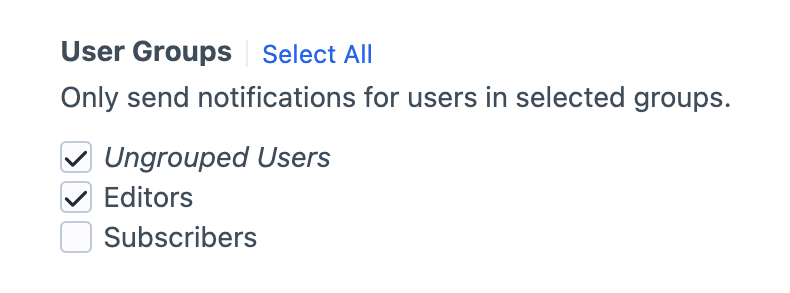
Selection is required
Check at least one group (or Ungrouped), or the notification won't fire.
Hidden if no groups exist
If no user groups are set up, this filter is skipped and every valid user will receive the notification.
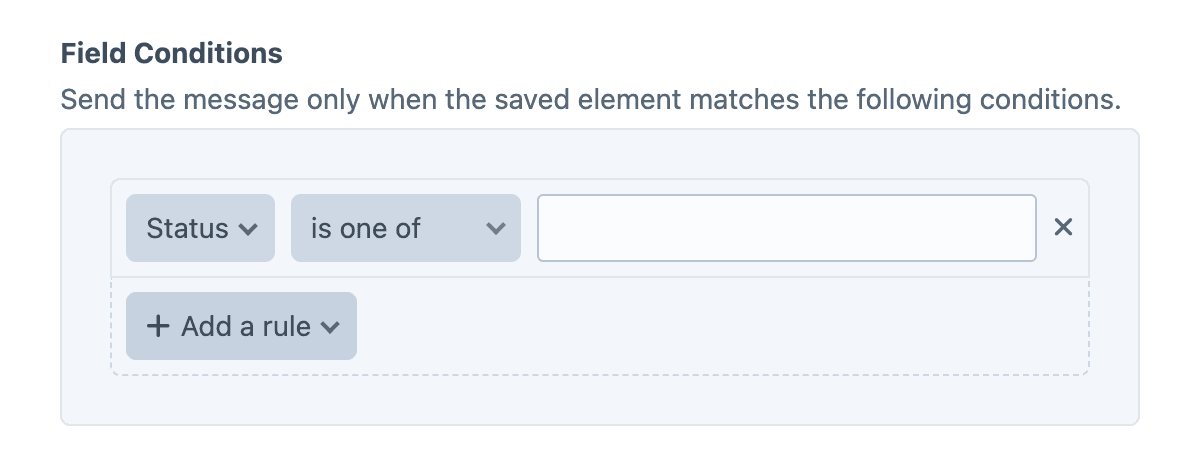
Field Conditions
Field conditions restrict the notification based on the element's content, using Craft's native conditions framework. Build a rule set against the element's attributes and field values, and the notification will be sent only when every rule matches.
Must match all conditions
The condition builder evaluates every rule with AND semantics, so each rule must pass for the notification to be sent.
Twig variables
The object variable (and its user alias) is the deleted User.
{{ user.fullName }} ({{ user.email }}) was just deleted.Examples
Alert administrators of an account deletion
A user account was just deleted.

- Name: {{ user.fullName }}
- Username: {{ user.username }}
- Email: {{ user.email }}
- Deleted by: {{ currentUser.fullName ?? 'system' }}
Only notify for admin-tier deletions
{% if not user.admin %}
    {% skipMessage "Only admin deletions are announced." %}
{% endif %}

Admin user deleted: {{ user.fullName }} ({{ user.email }}).
Capture the deletion in an audit log
User deleted at {{ now|date('Y-m-d H:i:s') }}:

- ID: {{ user.id }}
- Email: {{ user.email }}
- Groups: {{ user.groups|map(g => g.handle)|join(', ') ?: 'none' }}
- Deleted by: {{ currentUser.username ?? 'system' }}