Skip to content

User Permissions

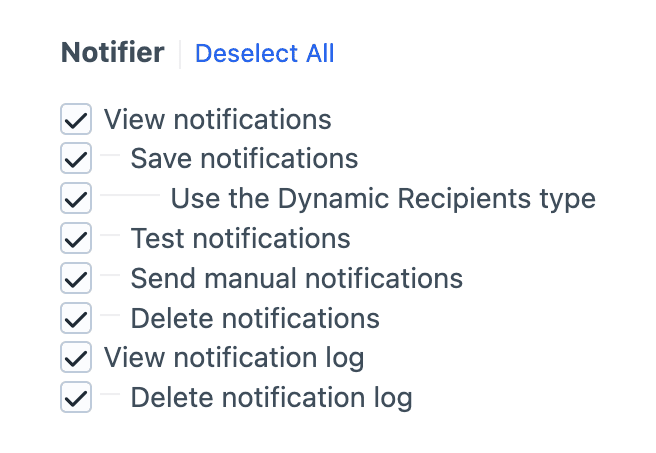
Notifier registers a series of permissions under a Notifier heading. These are split into two groups: one for managing notifications themselves, and the other for managing the notification log.

Screenshot of the Notifier permissions tree

Permissions are managed at the user-group level via Settings > Users > User Groups, or at the user level by viewing an individual user's Permissions.

Notifications

View notifications

Grants access to the Notifications section in the control panel, including the index, the edit screen, and slideouts. Without this permission, the user won't even see a "Notifier" link in the control panel navigation.

Read-Only Access

Users with "View notifications" but not "Save notifications" will see them as read-only (fields will not be editable).

Save notifications

Allows users to create, edit, duplicate, and draft notifications. Nests beneath "View notifications", because you cannot save what you cannot see.

Test notifications

Allows users to send a test message via the Send a test message button on the edit screen. Decoupled from "Save notifications" permission so trusted users can verify a notification's configuration without necessarily permitting them to make changes.

Send manual notifications

Allows users to manually send a notification from an element's edit screen or the element index. Separate from "Save notifications", so you can let a user send notifications without also letting them change how a notification is configured.

Delete notifications

Allows users to delete notifications.

Use the Dynamic Recipients type

Allows users to select and configure the Dynamic Recipients recipient type, which executes custom Twig snippets at send time. Nested beneath "Save notifications" because authoring those snippets is a privileged action.

⚠️ Security Warning - For Highly Trusted Users Only!

Do not grant "Use the Dynamic Recipients type" permission to untrusted users, because it will allow them to execute arbitrary Twig code at runtime.

Though the snippet will be processed in a Twig sandbox, you are still encouraged to only grant this permission to highly-trusted users, and guide those users on how to write secure Twig code.

Notification Log

View notification log

Grants access to the Notification Log utility under Utilities. The utility is hidden entirely from users without this permission.

Delete notification log

Allows users to delete individual log entries and/or entire days from the notification log.

Recommendations

A few useful configurations for common user types:

  • Read-only editor - View notifications only. The user can browse and inspect notifications, but every field on the edit screen is disabled and no save actions are available.
  • Standard editor - View notifications, Save notifications, Test notifications, Send manual notifications, Delete notifications. For full notification authoring.
  • Trusted editor - Same as standard editor, plus Use the Dynamic Recipients type. Granted to authors who are trusted to write Twig that runs at send time.
  • Log auditor - View notification log for read-only access to the audit trail.
  • Log auditor with cleanup - View notification log and Delete notification log. Useful for users responsible for keeping the log tidy.