
Importing Addresses
To import a collection of Addresses, use the free Feed Me (opens new window) plugin.
# Feed Me
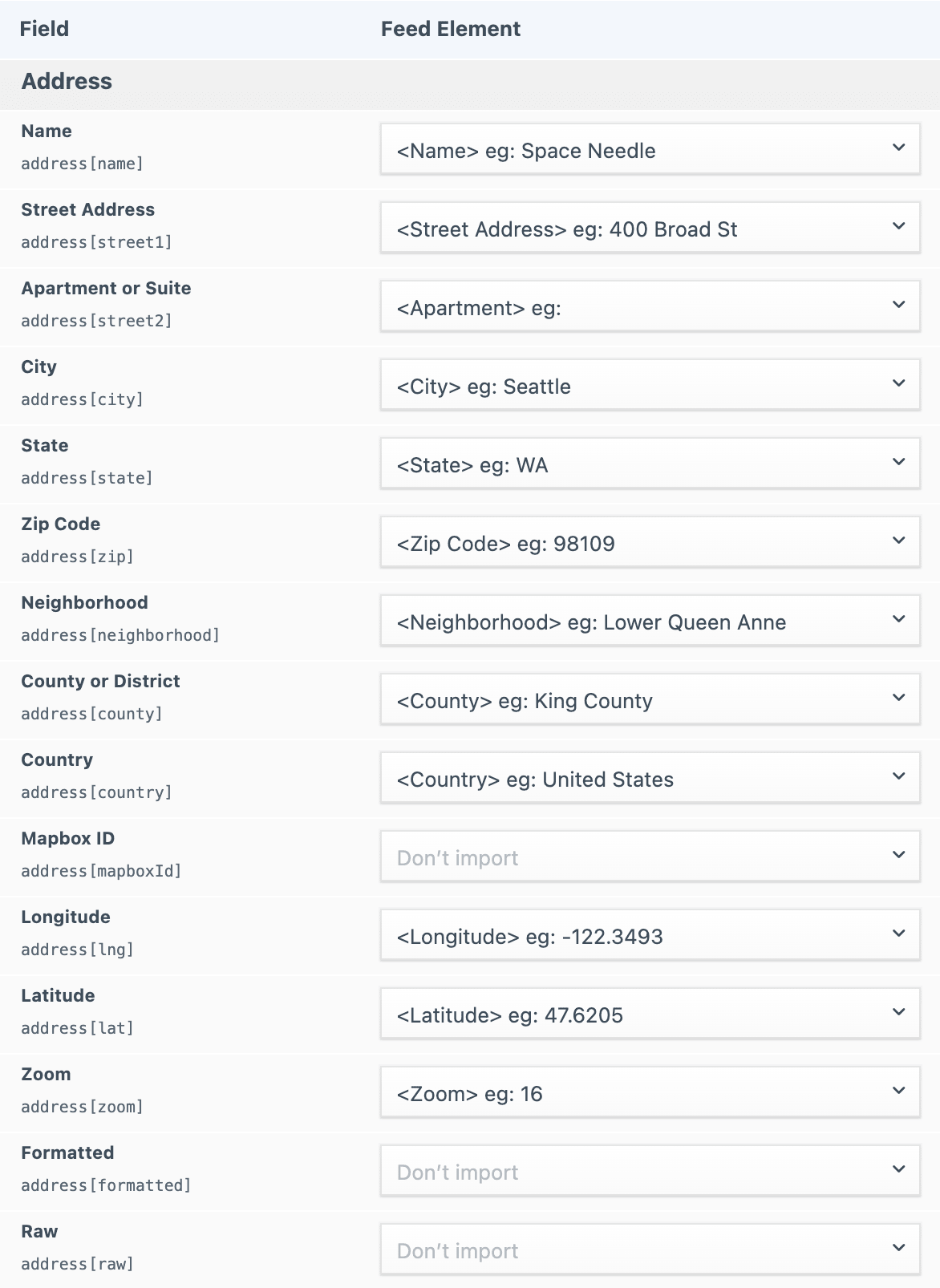
When configuring the feed, simply assign each column to its respective Address subfield...
# Bulk Geocoding
At the moment, this plugin does not support automatic geocoding during the import process. If you are importing address data that does not already contain valid coordinates, you may want to generate the coordinates before importing your data.
Bulk Geocode First
Before running the import, make sure you already have the latitude & longitude in your CSV. Otherwise, it will likely be a minor pain to generate each set of Address coordinates later.
# Geocoding from a CSV file
If conducting the import via a CSV file, we recommend running the data through an external bulk lookup service. Here are a few examples...
| Service | Analysis |
|---|---|
| SmartyStreets (opens new window) | Really nice data and easy to use, but expensive. |
| GPS Visualizer (opens new window) | Not as nice, but it’s free. |
| Geocodio (opens new window) | Nice and cheap. |
Once you've generated coordinates for each address in the CSV file, you can then import the complete set of data into Craft using Feed Me.